Jul 08 2026
First Look @ Gemma 4 on Cerebras: 3 Fast Multimodal Apps We Built
This guide walks through three multimodal applications built with Gemma 4, including document processing, image understanding, and video analysis.
We spent a week building multimodal use cases with Gemma 4, running on Cerebras at ~2,300 tok/s. Here are some of the things we built and our learnings.
For the first time, an open-weight multimodal model has broken the 2,000 tok/s barrier. Meet Gemma 4 31B on Cerebras.
As Google’s latest open-weight multimodal model, Gemma 4 brings vision, reasoning, long context, chain-of-thought, function calling, and strong agentic capabilities together in this 31B dense model.
Running on Cerebras at ~2,300 tokens/sec, it makes real-time multimodal agents, iterative reasoning, and interactive workflows practical.
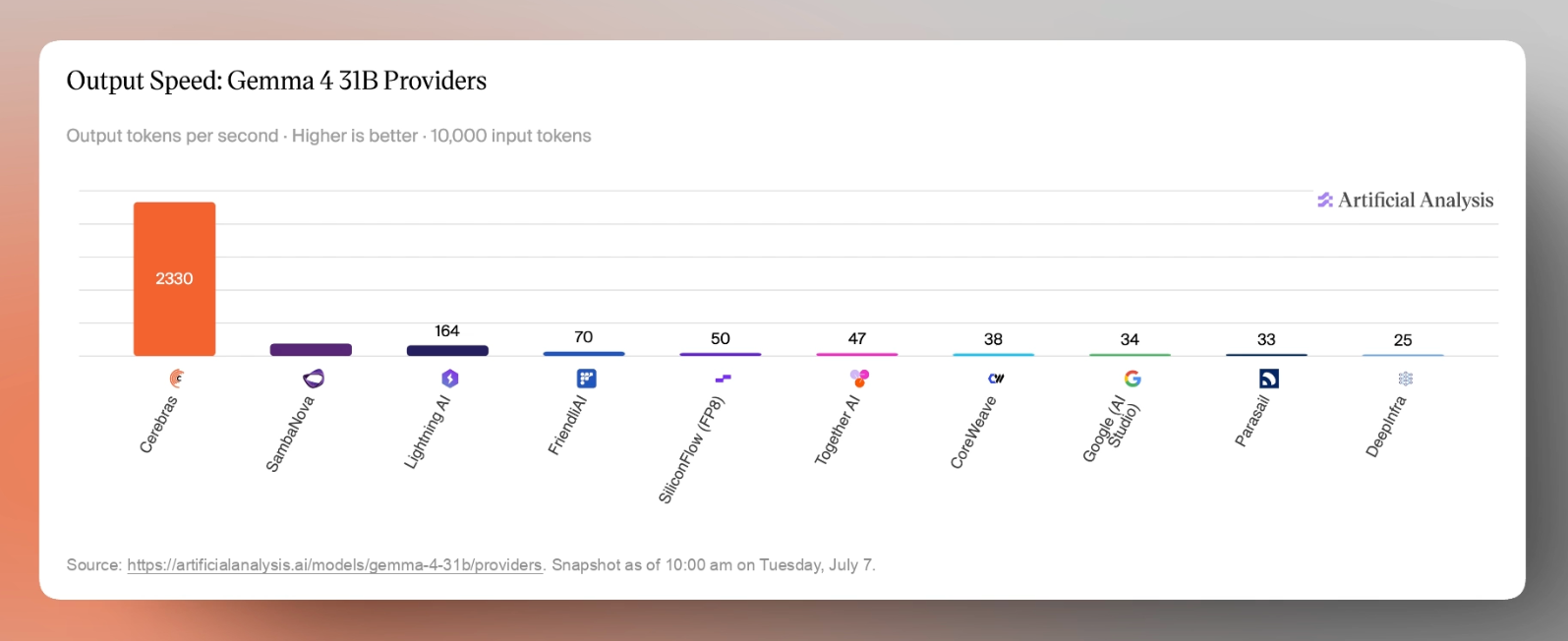
The specs on Cerebras:
- 31B dense model - 30.7B-parameter dense model, meaning all parameters participate in each inference pass.
- Vision-capable - Supports text + image input for OCR, document understanding, image search, object detection, UI understanding, and video-frame analysis.
- 131K context window - Handles long documents, large batches, agent traces, and multi-step workflows.
- 140+ languages - Built for multilingual use cases across global enterprise and consumer applications.
- Instruction-tuned - Optimized for following prompts, chat, structured JSON outputs, system instructions, function calling, and agentic workflows.
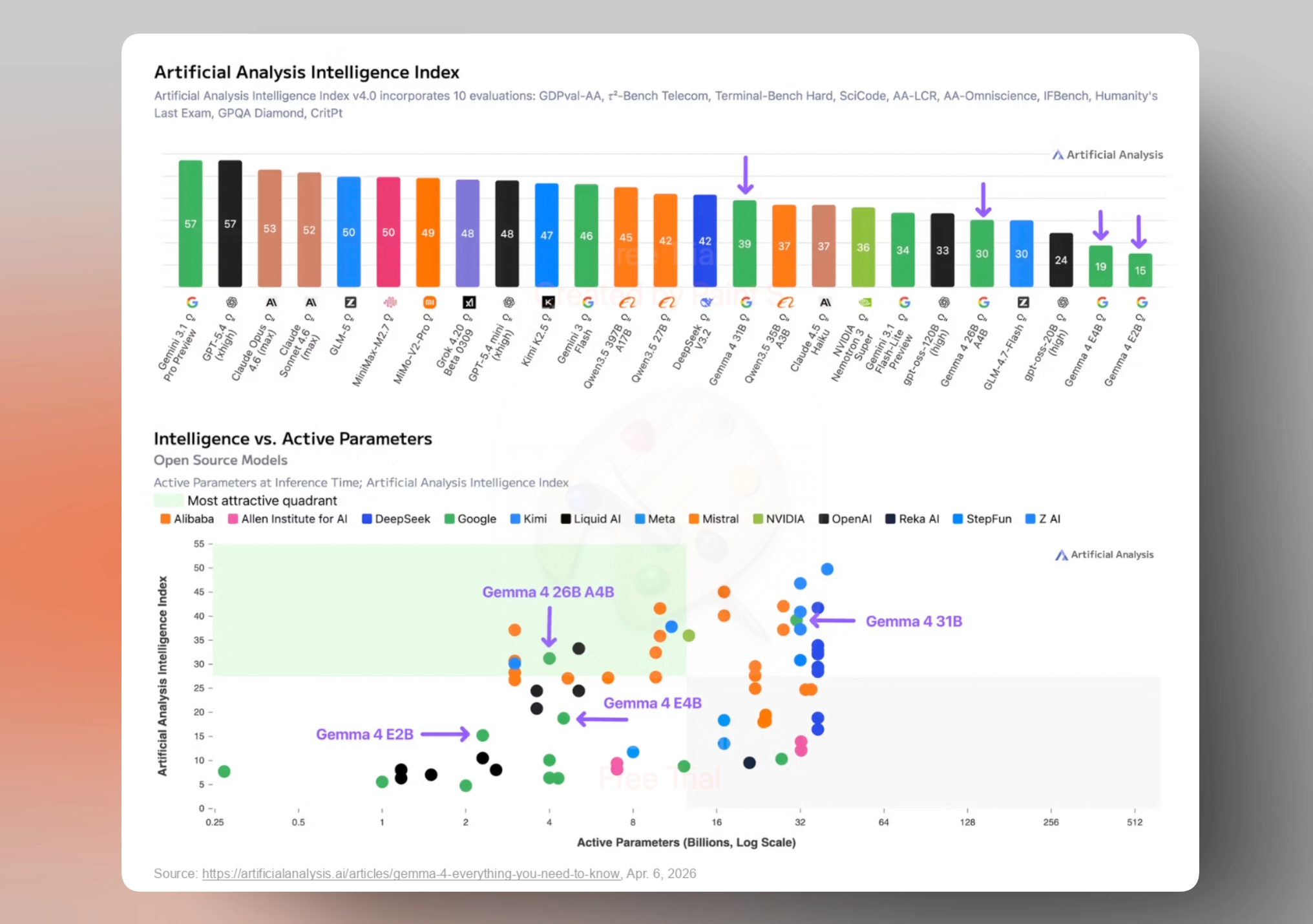
The bigger question is: how well those capabilities translate into real performance? According to Artificial Analysis, Gemma 4 represents a major jump over Gemma 3 26B, and ranks among the strongest open-weight models in its Intelligence Index, one of the leading independent benchmarks for model performance.
As the the first and fastest multimodal model hosted on Cerebras, we couldn't resist putting Gemma 4's image inputs to the test first.
Multimodality use cases we built and tested:
Document Analysis
First, we tested a classic multimodal workflow: side-by-side document analysis. We uploaded the 60-page DeepSeek-V4 technical report and asked Gemma 4 to explain the first three technical figures, including the graphics, charts, and key takeaways from each.
From upload to output, the full response returned in 1.79 seconds on Cerebras, compared to almost 25 seconds on GPU providers, a 17× speedup on Cerebras.

For researchers, this kind of speed changes the shape of literature review. Instead of waiting on a model to parse dense papers one at a time, they can quickly interrogate long technical documents, inspect figures, and move from question to answer while the context is still fresh.
Image Analysis
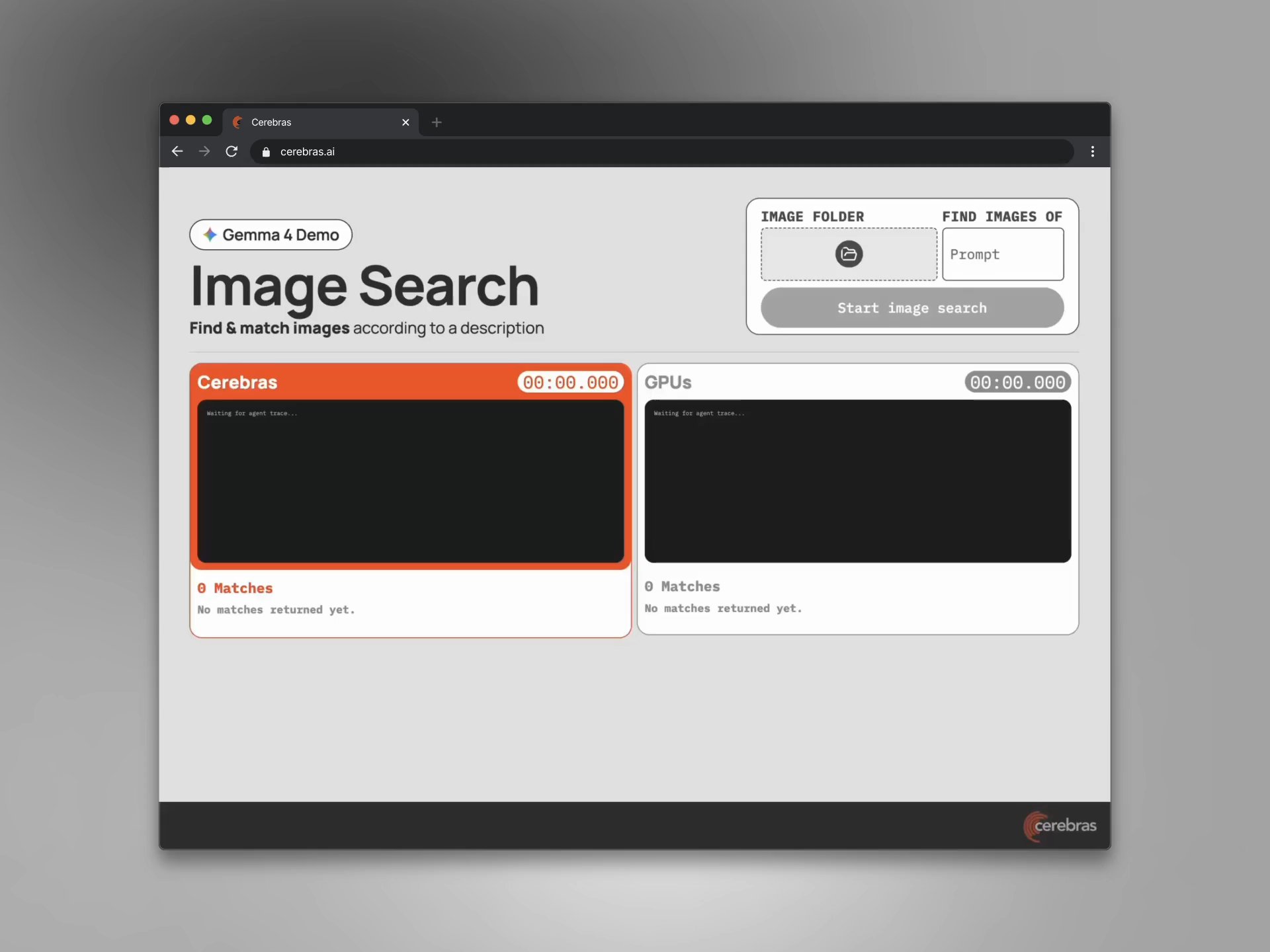
Next, we tested Image search, side by side against a popular GPU inference provider. For this demo, we point Gemma 4 to a folder of images, typed what we were looking for in plain language, like ’food’ or a ‘red car,’ and Gemma 4 starts two agents at the same time. The left side runs Gemma 4 on Cerebras, while the right side runs the same model on GPUs.
Both inference providers loop over the exact same set of 80 images, batched the same way, with the same prompt, so the only variable left is speed. The difference is not subtle. Reading that a model is many times faster is abstract, but seeing it live is not. We’ll let the video do the talking.
So far, we had tested Gemma 4 on static multimodal inputs: documents, charts, and images. But many real-world visual tasks are not single prompts. They unfold across frames, repeated calls, structured outputs, and downstream actions, where fast inference compounds across the whole pipeline.
Rental Car Damage Scout
Inspired by our teammate's recent Euro summer trip and a few rental cars along the way, we built Damage Scout, a rental car walk-around inspector.
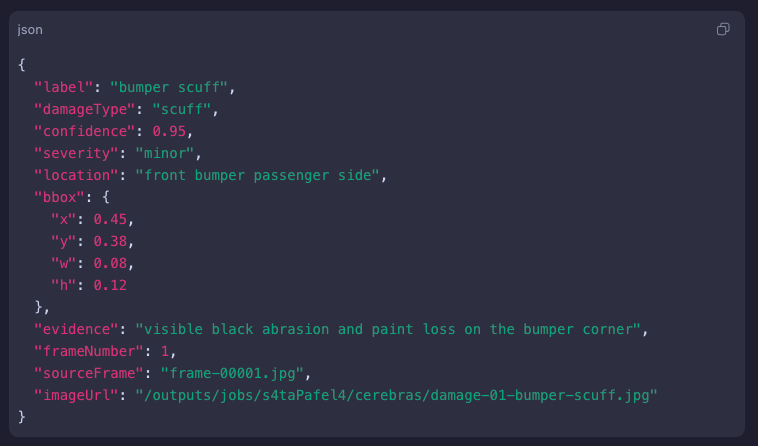
The workflow starts with a short vehicle walk-around video, the kind someone might record at rental pickup or drop-off. The app samples frames from the video, sends them to Gemma 4 on Cerebras, and asks for structured JSON describing any visible damage, its location, and the model’s confidence in its assessment.
From there, it deduplicates repeat sightings of the same scratch across frames, draws boxes on the clearest evidence frames, and assembles a damage report that can be reviewed or passed into the next step. All done within the time that you can blink.
Because the original video was recorded at 60fps, we sampled one frame every two seconds as the camera moved around the SUV. That produced 17 frames from a 34-second recording.
Here’s a sample result from a recent run we ran on Cerebras WSE-3 Wafers. Annotated frames started returning almost immediately, with visible damage labeled and boxed as the pipeline progressed.
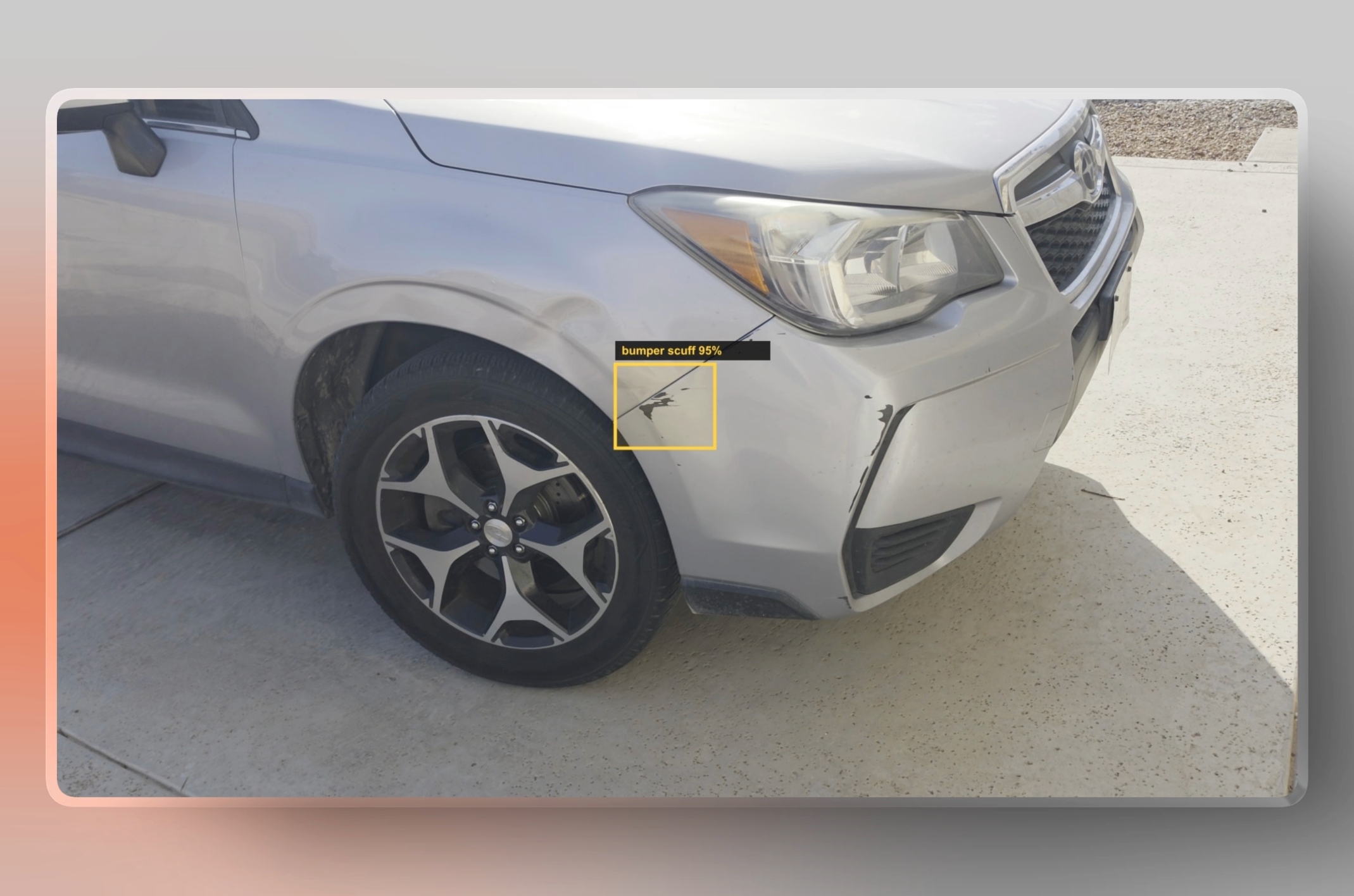
To draw the outlines on the images, we used Gemma 4’s structured outputs to generate the bounding boxes over the images using Javascript. Each batch of three images took an average of 300ms to process. All 17 frames were processed and annotated in just 5 seconds, start to finish.
The full side-by-side demo makes the latency difference obvious. Watch on as we run it side-by-side against a popular GPU provider serving the same Gemma 4 31B model. The results speak for themselves. Same request, same recording, ~17x faster.
Across these demos, the lesson became clear: Gemma 4 on Cerebras was fast enough to make multimodal workflows feel interactive, but raw inference speed was only part of the result. The experience worked because the surrounding system was designed for speed too: prompt format, image handling, batching, structured outputs, and tool orchestration all mattered.
Those lessons became a practical starting point for developers deploying Gemma 4 on Cerebras in real multimodal applications.
What we learned: 7 tips for fast multimodal apps
To get the most out of Gemma 4, speed has to be designed into the whole application, not just the model endpoint.
- Use the official chat template. Gemma 4 expects standard system, user, and assistant / model turns, along with the correct formatting for images, audio, thinking, tools, tool_calls, and tool_responses. When that structure is handled correctly, the model becomes much more reliable. When it is hand-rolled incorrectly, especially in agent workflows, reasoning quality can degrade in ways that look like model failure but are really harness issues.
- Start with Google’s recommended generation defaults. For generation, we used temperature: 1.0 and top_p: 0.95. That gave us a strong baseline before tuning for specific workflows like document analysis, image search, and video-frame analysis.
- Enable thinking mode intentionally. Thinking mode can help with reasoning-heavy workflows, but it should not be added everywhere by default. The official docs activate it with <|think|> in the system instruction, and it works best when consolidated with other system instructions and tool definitions in a single system turn.
- Keep multi-turn history clean. For multi-turn agents, raw thoughts should be stripped from normal conversation history, but preserved during a tool_call sequence when needed. For long-running agents, it is better to summarize previous reasoning and feed that summary back as normal text, instead of repeatedly injecting raw chain-of-thought and creating reasoning loops.
- Put images before text in multimodal prompts. Prompt structure matters. We found that image inputs should come before the text instruction, and the visual token budget should match the task. Image search and classification can often use lower visual detail, while document parsing, chart understanding, and frame-level inspection benefit from higher resolution and more visual tokens.
- Long context works best when the input is structured. A large context window is powerful, but not magic. Even with a 131K context window, we learned not to assume perfect retrieval. For document analysis and enterprise workflows, it is better to structure the task, ask for citations or extracted evidence, chunk when needed, and validate the output.
- Make the tool loop simple and explicit. When a workflow uses tools, the loop should stay clean: the model reasons, emits a tool_call, the application executes it, and then returns a tool_response for the model to continue. That structure helps preserve speed across the whole application instead of losing it in orchestration overhead.
The takeaway is simple: Gemma 4 is fast, but the best results come when the whole application preserves that speed. Clean templates, clear prompts, intentional reasoning, structured tool_calls, and the right multimodal settings are what turn raw inference speed into workflows that feel genuinely interactive.
Start building
The larger point is not just that you can print tokens faster. Rather, it is that low-latency multimodal inference changes what developers can reasonably design. Instead of building around long waits, progress bars, and batch jobs, you can build around real-time feedback, rapid iteration, and continuous interaction.
That shift opens up a different kind of product experience. It changes what and how you can build.
For developers, that opens up more ambitious product patterns: richer interactions, more frequent model calls, tighter feedback loops, and workflows that feel interactive by default. Speed becomes a foundation for the experience, not just a performance claim.
Gemma 4 is available today on Cerebras at cloud.cerebras.ai. Build with it, share what you make, and tag @cerebras on X.
—————————————-
Special thanks to Halley Chang, Tin Hoang, Manny Monge, and Sneha Khanvilkar for their design support, copyediting, and thoughtful review feedback.